

Introduction: 2025 — The First True Year of No-Code SaaS
Between 2015–2022, no-code was framed as a helpful shortcut for startups and marketers. But by 2023–2024, the narrative shifted—no-code became a legitimate foundation for digital products. What nobody expected, however, was that designers would become the primary builders of SaaS products by 2025, especially through one platform: Webflow.
Webflow’s evolution over the past decade is almost unprecedented. It started as a visual website builder resembling Adobe tools with HTML/CSS output. But with the introduction of the Data Manager, Memberships 2.0, Logic workflows, Webflow Apps, and deep AI integrations, it transformed from a CMS-driven frontend tool into a front-to-back no-code application framework.
Startup founders, designers, agencies, and even large enterprises now use Webflow to ship:
- full SaaS MVPs,
- membership-driven apps,
- AI-powered software,
- marketplaces,
- dashboards and analytics tools,
- internal enterprise apps built without dev teams.
2025 is the first year no-code SaaS isn’t just possible—it’s mainstream.
Why the SaaS Landscape Changed (and Why Webflow Fits Perfectly)
1. Traditional Development Is Too Slow for 2025’s Pace
Historically, building a SaaS product required a multi-disciplinary engineering team, months of development, and significant budget. Typical MVP timelines ranged from four to eight months and easily passed six figures for teams that needed custom backends, auth, billing, and integrations. Today’s market moves at a cadence that traditional development struggles to match: product requirements shift quickly, user feedback cycles are fast, and AI-driven features escalate expectations. For designers and small teams, time-to-market is often the deciding factor between success and failure. Webflow short-circuits this process by letting designers ship working MVPs in weeks rather than months, drastically reducing budget and risk.
2. AI Has Raised User Expectations
AI is no longer an optional enhancement — it’s expected. Users want features like AI-driven onboarding, personalized dashboards, and smart suggestions out of the gate. Building these features traditionally requires backend engineering for APIs, monitoring model costs, and updating models in response to user behavior. Webflow integrates visual logic and third-party API calls, allowing designers to wire AI into the product quickly. This means iterative experimentation with different models and prompt designs, which is essential for refining AI UX without long development cycles.
3. The No-Code Ecosystem Finally Reached Maturity
Between 2021 and 2024 the no-code ecosystem matured rapidly. Smaller tools began to interconnect through robust integrations and syncing layers; authentication became secure and enterprise-ready; and relational data models became feasible. By 2025, those improvements converged: no-code platforms support relational data, strong auth, hooks and webhooks, and complex logic flows. That ecosystem — Webflow plus Xano, Make (Integromat), Memberstack, Whalesync, and others — gives designers the same building blocks engineers traditionally used.
4. Designers Want Full Product Ownership
The role of the designer has expanded beyond visual polish. Designers now expect to take ownership of entire product experiences — to iterate on interactions, test hypotheses, and ship features without relying on engineering sprints. Webflow provides the tools needed to own the full lifecycle: design, data, logic, and deployment. This cultural shift changed not only how products are built, but who builds them.
The Webflow SaaS Stack in 2025: What Designers Are Actually Building
Webflow is no longer just a page-builder. The 2025 stack combines an opinionated, designer-friendly UI builder with a powerful data layer, native logic, and a thriving apps ecosystem. Below are the categories of SaaS commonly built visually.
Dashboards & Analytics Tools
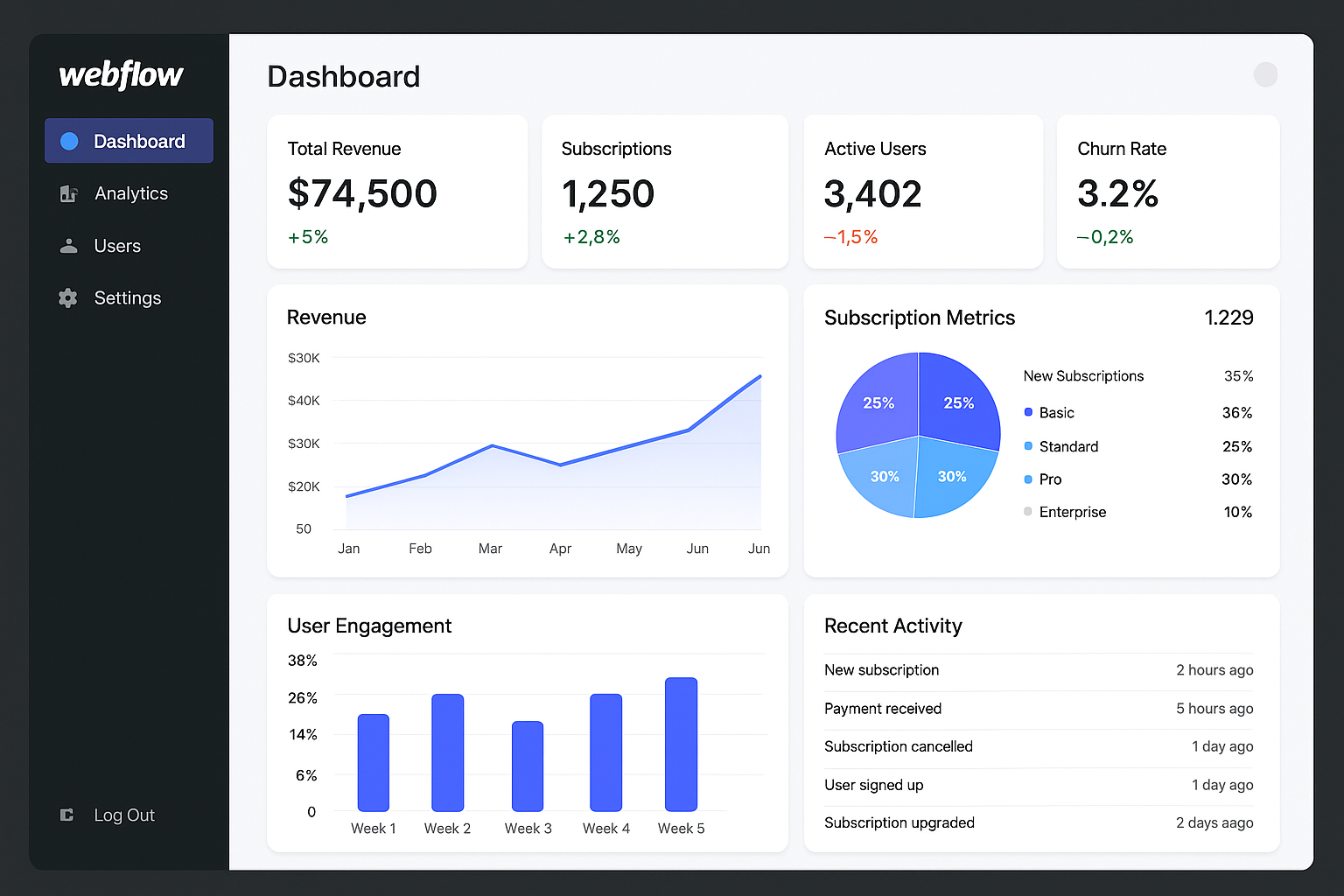
Dashboards are a prime example of applications that used to require backend engineering. Today, designers use Webflow’s Data Manager to define data schemas, link metrics to UI elements, and leverage charting plugins. Logic workflows update user-specific datasets in response to events, and integrations with analytics sources—e.g., YouTube, Google Analytics, or platform APIs—unify data for a single pane-of-glass view. Whether a creator wants to show earnings, engagement, and payout history or an agency needs client KPIs, these dashboards are production-ready.
Membership Platforms & Marketplaces
Memberships 2.0 brought role-based control, conditional visibility, and secure member areas. Designers now build marketplaces that handle vendor onboarding, role-based dashboards, and subscription tiers. For example, a fitness marketplace can host trainers, schedule bookings, accept payments, and show client progress — all assembled visually with conditional components and secure payments via Stripe.
AI-Powered Applications
Micro-SaaS AI products proliferated in 2025. Webflow’s logic can call AI endpoints to generate text, images, or recommendations, write results back to the Data Manager, and surface them in the UI. Designers experiment with prompt variants, A/B test output, and iterate on how AI integrates into UX without touching backend code. This iteration speed is a major advantage: product hypotheses powered by AI can be validated within days.
Internal Tools & CRMs
Companies that used to outsource internal tools now build them in-house. Inventory systems, project trackers, and HR portals — when requirements are well-defined and do not require extreme real-time performance — are built within Webflow’s environment. This reduces maintenance cost and centralizes ownership with the teams who use the tools daily.
Features That Make SaaS Possible in Webflow (2025 Edition)
Memberships 2.0: Real User Experiences
Memberships 2.0 provides secure signups, magic links, OAuth options, and role-based access control. Designers can create personalized onboarding, show or hide UI components based on roles, and embed account management flows directly inside the app. Webhooks and serverless actions allow the membership layer to integrate with billing, analytics, and external services.
Data Manager: The Heart of No-Code SaaS
The Data Manager is functionally a relational database with multi-reference fields, secure columns, and API-first access. When designing an app, treating the Data Manager as the canonical source of truth simplifies development: UI elements reference data tables, logic workflows update records, and APIs read/write data for third-party tools. For many SaaS apps, this eliminates the need for a separate backend and reduces data synchronization complexity.
Logic: Visual Backend Workflows
Logic is a visual automation engine embedded in Webflow. Designers can configure triggers — such as form submissions or membership events — to call APIs, write to Data Manager tables, send emails, and invoke AI endpoints. This keeps workflow logic close to the UI and makes the product behavior transparent to non-developers.
Apps Ecosystem: Extendability Without Code
The Webflow Apps marketplace is now a critical part of the SaaS builder’s toolkit. Apps like Memberstack for advanced auth, Whalesync for real-time syncing, Xano for heavy backend lifting, and Chart builders for visualizations plug into Webflow with minimal setup. This ecosystem expands Webflow beyond its native features and reduces the need for bespoke engineering when advanced capabilities are required.
AI Tools Built Into the Flow
Webflow’s integrated AI helps designers automate layout creation, accessibility auditing, and responsive scaling. But more importantly, designers connect production AI services to deliver intelligent app features — from content summarization to predictive recommendations — while maintaining control over prompts, outputs, and UX integration.
Case Studies — Real SaaS Built in Webflow (2024–2025)
Creator Analytics Platform
Launch time: 5 weeks • Cost: <$7,000
A creator-focused analytics product consolidated earnings and engagement metrics from multiple platforms, added AI-driven insight cards that highlighted growth opportunities, and provided automated payout summaries connected to Stripe. Designers used Webflow for the UI, Xano for complex data transformations, and Make.com for ingestion pipelines.
Niche Fitness SaaS
Launch time: 3 weeks • No developers hired
Independent coaches sold programs, scheduled sessions, and tracked client progress inside a member area. The site used Webflow Memberships, the Data Manager to store routines and progress logs, and Webflow Logic to trigger weekly check-ins and AI-generated workouts.
Enterprise HR Portal
Savings: ~$300,000 in dev costs
A Fortune 500 firm rebuilt onboarding and internal training dashboards. Rather than relying on a large in-house team to maintain a custom product, HR and design teams built flows in Webflow and maintained them internally, resulting in faster updates and better alignment with HR needs.
These case studies illustrate a range of typical outcomes: rapid launches, small budgets, and immediate iteration capability. They also show when external backend tools still play a role — Xano for heavy relational queries and Make.com for complex integrations — while Webflow remains the single source for UI and workflows.
Step-by-Step: How Designers Build SaaS in Webflow
The process of building a SaaS product visually has repeatable phases. Below is a practical workflow that teams use when launching in Webflow.
Step 1 — Define Roles & Permissions
Begin by listing all user roles (admin, end user, vendor, reviewer) and defining what each role can see and do. This informs your data schema and UI visibility rules upfront, preventing costly redesigns later.
Step 2 — Design the Database (Data Manager)
Map your data tables: users, subscriptions, transactions, products, analytics, AI outputs, and any domain-specific entities. Use multi-reference fields so records can relate to each other — for example, customers to subscriptions, or sessions to coaches. Define which fields are secure or editable by end users.
Step 3 — Build the UI in the Designer
Create modular components (cards, lists, filters, modals) and design responsive layouts for desktop and mobile. Use symbols or component collections for repeated elements; keeping the UI modular accelerates changes and testing.
Step 4 — Configure Logic Workflows
Wire event triggers to actions: on signup, create a profile; on payment, update subscription; on form submit, call an AI API and write results back to Data Manager. Keep logic readable and document each workflow for maintainability.
Step 5 — Add Authentication & Billing
Implement Memberstack or Webflow Memberships for auth, then connect Stripe (via the Stripe App or direct webhooks) for subscription management. Make sure trials, coupons, cancellations, and proration are supported in your flow.
Step 6 — Connect AI & External APIs
Use Logic to call OpenAI, Claude, or domain-specific APIs. Design prompts and UI pathways where AI output is validated or edited by users when appropriate. Track costs by sampling API usage and optimizing prompt design.
Step 7 — Test, Deploy, Iterate
Publish to staging or a test environment, run user tests, and fix edge cases. Once validated, publish to production. One of the advantages here is iteration speed: shipping small changes is friction-free.
Performance & Security in 2025 Webflow Apps
Security Upgrades
Webflow in 2025 supports enterprise-grade security features including encrypted user fields, token-based integrations, SOC 2 readiness options for larger customers, and SSO for corporate customers. Carefully model sensitive data and keep PII encrypted or offloaded to secure third-party stores when necessary.
Performance
Thanks to a global CDN, optimized asset delivery, lazy loading, and serverless logic, Webflow apps deliver snappy experiences. For data-heavy pages, consider pagination and server-side transforms (via Xano) to prevent large payloads. Performance monitoring remains critical — instrument key user flows and watch for slow API responses that can degrade the perceived speed of your app.
Limitations: When Webflow Isn’t the Right Fit
Webflow is powerful, but there are cases where engineering is still required:
Real-Time, Low-Latency Experiences
Applications that require sub-100ms updates or complex collaborative editing (e.g., design tools that act like Figma) still need custom engineering. Webflow works for many dashboards and admin apps but not for high-frequency trading or real-time multiplayer products.
Complex Data Manipulation & Extreme Scale
If your product requires intensive relational queries, data warehousing, or complex joins, a dedicated backend (Xano, Supabase, or custom services) will be a better fit. Many teams adopt a hybrid approach: Webflow for UI and lighter logic, plus a dedicated backend for heavy processing.
Native Mobile Considerations
Webflow apps can be wrapped into mobile containers (Cordova/Capacitor) for simple use cases, but when you need a true native UX with background processing and native push notifications, native app development is still required. Rumors of native export features exist, but as of 2025 this remains an area in progress.
Future Predictions — Where Webflow May Head by 2027
Based on current trajectories and community demand, several likely developments could appear by 2027:
- Native backend builder: a fully integrated visual backend that removes the need for third-party services in most cases.
- SaaS blueprints marketplace: templated app starters (e.g., “Marketplace Starter”, “Creator Dashboard”) for rapid launches.
- Real-time collaboration: presence, multi-user editing in dashboards, and live updates for team apps.
- Mobile-first export: improved mobile wrappers or true native app export capabilities.
- AI-driven product generation: describe your product in plain language and have Webflow scaffold UI, data models, and workflows automatically.
These changes would make Webflow an even more complete platform for designers and non-engineers building production software.
Conclusion — Designers Are Now Software Creators
Webflow didn’t merely improve a builder — it shifted who gets to build software. Designers are shipping entire SaaS products, agencies are launching new product lines, and founders can validate ideas at a fraction of the traditional cost. This doesn’t eliminate engineers’ roles, but it democratizes launch and iteration. For 80% of common SaaS use cases, Webflow in 2025 is a practical, fast, and cost-effective foundation for production applications.
If you’re a designer or a small team, the path is clear: learn the Data Manager, master Logic, explore the apps ecosystem, and pair Webflow with targeted backend services when necessary. If you’re an engineer, expect to collaborate differently — as Webflow users increasingly own product delivery, engineering becomes the glue for extreme scale and high-performance needs.
